 SUCHEN SIE DIE PASSENDE
INDUSTRIELLE LÖSUNG?
Entdecken Sie Embedded-, Kommunikations- und Automatisierungslösungen für Ihre Anwendung.
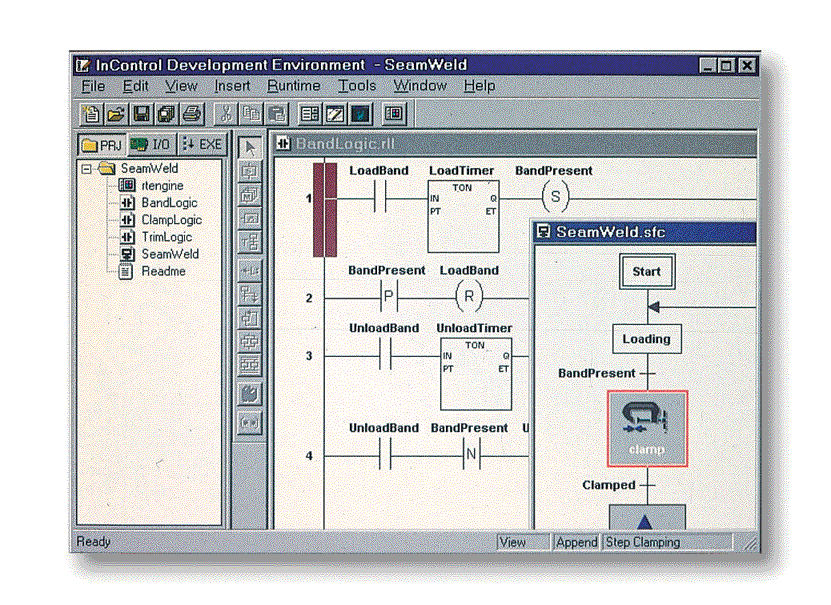
- ISaGRAF Integration: Provides a direct interface between ISaGRAF Target runtime and NuDAM6000 serial I/O modules, enabling real‑time control and monitoring.
- IEC1131‑3 Compliance: Fully compatible with the internationally recognized IEC1131‑3 standard for industrial control programming languages (IL, ST, FBD, LD, SFC).
- PC‑Based Soft PLC Functionality: Converts a standard Windows NT‑based PC into a high‑performance, software‑driven PLC system.
- Multi‑Module Support: Supports seventeen NuDAM6000 module types, including analog input/output, digital input/output, and counter/frequency modules.
- Flexible Configuration: Allows configuration of communication parameters (baud rate, parity, address) and module‑specific modes (alarm, latch, momentary, counter, frequency).
- Comprehensive Development Environment: Works seamlessly with the ISaGRAF Workbench for project creation, debugging, simulation, and online monitoring.
- Sample Programs Included: Provides pre‑configured ISaGRAF sample projects for each supported NuDAM module to accelerate application development.
- Automatic Installation and Uninstallation: Includes setup utilities for easy deployment and removal via Windows Control Panel.
- Demo Mode: Offers a 120‑minute demonstration mode for evaluation without a valid license key.
- Compatibility with ADLINK Tools: Integrates with NuDAM Administration Utility and COM Port Configuration Tool (ComConfig.exe).
- IEC1131‑3 Compliance: Fully compatible with the internationally recognized IEC1131‑3 standard for industrial control programming languages (IL, ST, FBD, LD, SFC).
- PC‑Based Soft PLC Functionality: Converts a standard Windows NT‑based PC into a high‑performance, software‑driven PLC system.
- Multi‑Module Support: Supports seventeen NuDAM6000 module types, including analog input/output, digital input/output, and counter/frequency modules.
- Flexible Configuration: Allows configuration of communication parameters (baud rate, parity, address) and module‑specific modes (alarm, latch, momentary, counter, frequency).
- Comprehensive Development Environment: Works seamlessly with the ISaGRAF Workbench for project creation, debugging, simulation, and online monitoring.
- Sample Programs Included: Provides pre‑configured ISaGRAF sample projects for each supported NuDAM module to accelerate application development.
- Automatic Installation and Uninstallation: Includes setup utilities for easy deployment and removal via Windows Control Panel.
- Demo Mode: Offers a 120‑minute demonstration mode for evaluation without a valid license key.
- Compatibility with ADLINK Tools: Integrates with NuDAM Administration Utility and COM Port Configuration Tool (ComConfig.exe).
Comprehensive Product Summary: ADLINK NDS‑ISG ISaGRAF Driver for NuDAM6000 Series Modules (Windows NT)
### 1. Product Overview
Product Name: NDS‑ISG ISaGRAF Driver
Model: NDS‑ISG
Series: ISaGRAF Interfaces for NuDAM6000 Series Modules
Article Number: NDS‑ISG
Manufacturer: ADLINK Technology Inc.
Manual Revision: Rev. 1.00a (September 2, 1999)
Supported Platform: Windows NT 4.0 or later
Copyright: © 1997–1999 ADLINK Technology Inc.
The ADLINK NDS‑ISG is a specialized software driver designed to integrate ADLINK’s NuDAM6000 series distributed I/O modules with the ISaGRAF industrial automation environment. It enables seamless communication between ISaGRAF’s runtime target and NuDAM6000 analog and digital I/O modules, allowing PC‑based control systems to function as software‑based PLCs compliant with IEC1131‑3 standards.
### 2. Key Features
- ISaGRAF Integration: Provides a direct interface between ISaGRAF Target runtime and NuDAM6000 serial I/O modules, enabling real‑time control and monitoring.
- IEC1131‑3 Compliance: Fully compatible with the internationally recognized IEC1131‑3 standard for industrial control programming languages (IL, ST, FBD, LD, SFC).
- PC‑Based Soft PLC Functionality: Converts a standard Windows NT‑based PC into a high‑performance, software‑driven PLC system.
- Multi‑Module Support: Supports seventeen NuDAM6000 module types, including analog input/output, digital input/output, and counter/frequency modules.
- Flexible Configuration: Allows configuration of communication parameters (baud rate, parity, address) and module‑specific modes (alarm, latch, momentary, counter, frequency).
- Comprehensive Development Environment: Works seamlessly with the ISaGRAF Workbench for project creation, debugging, simulation, and online monitoring.
- Sample Programs Included: Provides pre‑configured ISaGRAF sample projects for each supported NuDAM module to accelerate application development.
- Automatic Installation and Uninstallation: Includes setup utilities for easy deployment and removal via Windows Control Panel.
- Demo Mode: Offers a 120‑minute demonstration mode for evaluation without a valid license key.
- Compatibility with ADLINK Tools: Integrates with NuDAM Administration Utility and COM Port Configuration Tool (ComConfig.exe).
### 3. Technical Specifications
Supported Operating System:
- Microsoft Windows NT 4.0 or later
Hardware Requirements:
- IBM PC/AT or compatible system, or CompactPCI platform
- 1.44‑MB 3.5‑inch floppy drive or CD‑ROM drive
- Hard disk with sufficient free space for installation
Software Requirements:
- CJ International ISaGRAF Workbench and ISaGRAF Target for Windows NT
- ADLINK NuDAM6000 series modules
Supported NuDAM6000 Modules:
ND‑6011 / ND‑6011D, ND‑6012 / ND‑6012D, ND‑6013, ND‑6014D, ND‑6017, ND‑6018, ND‑6021, ND‑6024, ND‑6050, ND‑6052, ND‑6053, ND‑6054, ND‑6056, ND‑6058, ND‑6060, ND‑6063, ND‑6080
Installation Directory (Default):
`C:\Program Files\ADLINK\NDS‑ISG`
Program Folder (Default):
`NDS‑ISG`
Distribution Media:
- ADLINK “NDS‑ISG” diskettes (3.5" floppy)
- ADLINK “All‑in‑One Compact Disc”
Licensing:
- Requires valid serial number for full functionality
- 120‑minute demo mode available without license
### 4. Functionality
The NDS‑ISG driver acts as a communication bridge between the ISaGRAF runtime environment (Target) and ADLINK’s NuDAM6000 serial I/O modules. Once installed, it allows ISaGRAF control programs to read analog and digital input data from NuDAM modules and send output commands to external devices.
Operational Workflow:
1. Program Development: Users create control logic in ISaGRAF Workbench using IEC1131‑3 languages.
2. Program Deployment: The compiled control program is downloaded to the ISaGRAF Target running on Windows NT.
3. Driver Integration: The NDS‑ISG driver links ISaGRAF variables to physical I/O channels on NuDAM modules.
4. Data Exchange: The driver manages bidirectional data flow—acquiring sensor data and transmitting control signals.
Use Cases and Applications:
- Industrial process automation
- Machine control and monitoring
- Data acquisition systems
- Laboratory automation
- PC‑based PLC replacement in distributed control environments
Compatibility:
- Fully compatible with ISaGRAF Workbench and Target for Windows NT
- Supports RS‑232 or Ethernet communication between Workbench and Target
- Works with ADLINK’s NuDAM Administration Utility for module configuration
### 5. Components & Accessories
Included Software Components:
- NDS‑ISG ISaGRAF Driver for Windows NT
- COM Port Configuration Utility (ComConfig.exe)
- ISaGRAF I/O Board and Equipment Object archives
- Sample ISaGRAF projects for each supported NuDAM module
Optional Accessories:
- ADLINK NuDAM6000 series I/O modules (sold separately)
- ADLINK All‑in‑One Software CD
- NuDAM Administration Utility
Connectors and Interfaces:
- Serial communication via COM ports (RS‑232/RS‑485 depending on module)
- Software interface through ISaGRAF I/O Connection Editor
### 6. Installation & Setup
System Requirements:
- Windows NT 4.0 or later
- ISaGRAF Workbench and Target installed
- Available COM port for NuDAM module communication
Installation Procedure (Floppy Disk):
1. Insert “NDS‑ISG ISaGRAF Driver Disk 1” into drive A:.
2. From Windows NT, select *Run* → type `A:\SETUP`.
3. Follow on‑screen prompts to enter user information and serial number.
4. Choose installation directory (default: `C:\Program Files\ADLINK\NDS‑ISG`).
5. Complete setup and verify program folder creation.
Installation Procedure (CD‑ROM):
1. Insert “ADLINK All‑in‑One Compact Disc” into CD‑ROM drive.
2. If autorun does not start, execute `x:\setup.exe` (x = CD‑ROM drive letter).
3. Select *Software Package → NDS‑ISG/NT* to begin installation.
Uninstallation:
- Open *Control Panel → Add/Remove Programs*
- Select “NDS‑ISG/NT” and click *Remove*
Restoring ISaGRAF I/O Objects:
- Use ISaGRAF Archive Manager to restore “I/O Complex Equipments” and “I/O Boards” from diskette or CD directory (`Software\NDS‑ISG\ISaGRAF I/O Board and I/O Equipment Objects`).
Restoring Sample Programs:
- Use ISaGRAF Archive Manager for “Project” to restore sample programs from diskette or CD (`Software\NDS‑ISG ISaGRAF Sample Program`).
### 7. Performance & Capabilities
Supported Module Modes:
- ND‑6011 / ND‑6012 / ND‑6014:
- Disable Alarm Mode
- Enable Alarm (Latch Mode)
- Enable Alarm (Momentary Mode)
- ND‑6080:
- Counter Mode (Disable Alarm)
- Counter Mode (Enable Alarm)
- Frequency Mode (Enable Alarm)
Communication Configuration:
- Adjustable baud rate and parity via ComConfig.exe
- Module address and checksum configurable via NuDAM Administration Utility
- Data format must be set to “Engineering” type
I/O Channel Assignment:
- Each module provides a specific number and type of channels (AI, AO, DI, DO).
- Channels are mapped to ISaGRAF variables through the I/O Connection Editor.
Performance Highlights:
- Real‑time data exchange between ISaGRAF runtime and NuDAM modules
- Supports multiple modules simultaneously
- Efficient serial communication for distributed I/O networks
- Enables deterministic control logic execution on Windows NT platform
Limitations:
- Supports only Windows NT ISaGRAF Target (not DOS, VxWorks, or OS‑9)
- Requires valid license for continuous operation beyond demo period
- Dependent on proper COM port and module configuration
### 8. Standards & Compliance
Software Standards:
- IEC1131‑3 (International Standard for Programmable Controller Languages)
Operating System Compatibility:
- Microsoft Windows NT 4.0 or later
Hardware Compatibility:
- IBM PC/AT or compatible systems
- CompactPCI industrial computers
Regulatory and Trademark Notices:
- NuDAM and NDS‑ISG are registered trademarks of ADLINK Technology Inc.
- IBM PC is a registered trademark of International Business Machines Corporation.
- Other product names are trademarks or registered trademarks of their respective owners.
Compliance Notes:
- Designed for industrial automation and control applications
- Follows ADLINK’s internal quality and reliability standards
### 9. Additional Information
Warranty and Liability:
- ADLINK provides no explicit warranty beyond standard product terms.
- The manufacturer is not liable for direct, indirect, incidental, or consequential damages arising from use or inability to use the product.
Support and Contact:
- Website: [http://www.adlink.com.tw](http://www.adlink.com.tw)
- Email: service@adlink.com.tw
Maintenance:
- Software updates may be released to improve reliability and functionality.
- Users should periodically check ADLINK’s website for driver updates or patches.
Documentation:
- User Guide: “ISaGRAF Interfaces for NuDAM6000 Series Modules”
- Manual Revision: 1.00a (September 2, 1999)
Sample Program Library:
- ND‑6011 / ND‑6011L / ND‑6011M
- ND‑6012 / ND‑6012L / ND‑6012M
- ND‑6013, ND‑6014 / ND‑6014L / ND‑6014M
- ND‑6017, ND‑6018, ND‑6021, ND‑6024
- ND‑6050, ND‑6052, ND‑6053, ND‑6054, ND‑6056, ND‑6058
- ND‑6060, ND‑6063, ND‑6080 / ND‑6080C / ND‑6080F
Each sample demonstrates driver usage, alarm configuration, and I/O mapping for the corresponding module type.
Update Policy:
- ADLINK reserves the right to modify product design and documentation without prior notice to improve reliability and performance.
### Summary
The ADLINK NDS‑ISG ISaGRAF Driver is a robust, Windows NT‑based software interface that bridges the ISaGRAF industrial automation environment with ADLINK’s NuDAM6000 distributed I/O modules. It transforms a standard PC into a fully functional, software‑based PLC system compliant with IEC1131‑3 standards. Supporting a wide range of analog, digital, and counter modules, the NDS‑ISG driver enables flexible, scalable, and cost‑effective control solutions for industrial and laboratory automation.
With comprehensive configuration utilities, sample programs, and seamless ISaGRAF integration, the NDS‑ISG driver provides a complete platform for developing, deploying, and managing PC‑based control systems in demanding industrial environments.
### 1. Product Overview
Product Name: NDS‑ISG ISaGRAF Driver
Model: NDS‑ISG
Series: ISaGRAF Interfaces for NuDAM6000 Series Modules
Article Number: NDS‑ISG
Manufacturer: ADLINK Technology Inc.
Manual Revision: Rev. 1.00a (September 2, 1999)
Supported Platform: Windows NT 4.0 or later
Copyright: © 1997–1999 ADLINK Technology Inc.
The ADLINK NDS‑ISG is a specialized software driver designed to integrate ADLINK’s NuDAM6000 series distributed I/O modules with the ISaGRAF industrial automation environment. It enables seamless communication between ISaGRAF’s runtime target and NuDAM6000 analog and digital I/O modules, allowing PC‑based control systems to function as software‑based PLCs compliant with IEC1131‑3 standards.
### 2. Key Features
- ISaGRAF Integration: Provides a direct interface between ISaGRAF Target runtime and NuDAM6000 serial I/O modules, enabling real‑time control and monitoring.
- IEC1131‑3 Compliance: Fully compatible with the internationally recognized IEC1131‑3 standard for industrial control programming languages (IL, ST, FBD, LD, SFC).
- PC‑Based Soft PLC Functionality: Converts a standard Windows NT‑based PC into a high‑performance, software‑driven PLC system.
- Multi‑Module Support: Supports seventeen NuDAM6000 module types, including analog input/output, digital input/output, and counter/frequency modules.
- Flexible Configuration: Allows configuration of communication parameters (baud rate, parity, address) and module‑specific modes (alarm, latch, momentary, counter, frequency).
- Comprehensive Development Environment: Works seamlessly with the ISaGRAF Workbench for project creation, debugging, simulation, and online monitoring.
- Sample Programs Included: Provides pre‑configured ISaGRAF sample projects for each supported NuDAM module to accelerate application development.
- Automatic Installation and Uninstallation: Includes setup utilities for easy deployment and removal via Windows Control Panel.
- Demo Mode: Offers a 120‑minute demonstration mode for evaluation without a valid license key.
- Compatibility with ADLINK Tools: Integrates with NuDAM Administration Utility and COM Port Configuration Tool (ComConfig.exe).
### 3. Technical Specifications
Supported Operating System:
- Microsoft Windows NT 4.0 or later
Hardware Requirements:
- IBM PC/AT or compatible system, or CompactPCI platform
- 1.44‑MB 3.5‑inch floppy drive or CD‑ROM drive
- Hard disk with sufficient free space for installation
Software Requirements:
- CJ International ISaGRAF Workbench and ISaGRAF Target for Windows NT
- ADLINK NuDAM6000 series modules
Supported NuDAM6000 Modules:
ND‑6011 / ND‑6011D, ND‑6012 / ND‑6012D, ND‑6013, ND‑6014D, ND‑6017, ND‑6018, ND‑6021, ND‑6024, ND‑6050, ND‑6052, ND‑6053, ND‑6054, ND‑6056, ND‑6058, ND‑6060, ND‑6063, ND‑6080
Installation Directory (Default):
`C:\Program Files\ADLINK\NDS‑ISG`
Program Folder (Default):
`NDS‑ISG`
Distribution Media:
- ADLINK “NDS‑ISG” diskettes (3.5" floppy)
- ADLINK “All‑in‑One Compact Disc”
Licensing:
- Requires valid serial number for full functionality
- 120‑minute demo mode available without license
### 4. Functionality
The NDS‑ISG driver acts as a communication bridge between the ISaGRAF runtime environment (Target) and ADLINK’s NuDAM6000 serial I/O modules. Once installed, it allows ISaGRAF control programs to read analog and digital input data from NuDAM modules and send output commands to external devices.
Operational Workflow:
1. Program Development: Users create control logic in ISaGRAF Workbench using IEC1131‑3 languages.
2. Program Deployment: The compiled control program is downloaded to the ISaGRAF Target running on Windows NT.
3. Driver Integration: The NDS‑ISG driver links ISaGRAF variables to physical I/O channels on NuDAM modules.
4. Data Exchange: The driver manages bidirectional data flow—acquiring sensor data and transmitting control signals.
Use Cases and Applications:
- Industrial process automation
- Machine control and monitoring
- Data acquisition systems
- Laboratory automation
- PC‑based PLC replacement in distributed control environments
Compatibility:
- Fully compatible with ISaGRAF Workbench and Target for Windows NT
- Supports RS‑232 or Ethernet communication between Workbench and Target
- Works with ADLINK’s NuDAM Administration Utility for module configuration
### 5. Components & Accessories
Included Software Components:
- NDS‑ISG ISaGRAF Driver for Windows NT
- COM Port Configuration Utility (ComConfig.exe)
- ISaGRAF I/O Board and Equipment Object archives
- Sample ISaGRAF projects for each supported NuDAM module
Optional Accessories:
- ADLINK NuDAM6000 series I/O modules (sold separately)
- ADLINK All‑in‑One Software CD
- NuDAM Administration Utility
Connectors and Interfaces:
- Serial communication via COM ports (RS‑232/RS‑485 depending on module)
- Software interface through ISaGRAF I/O Connection Editor
### 6. Installation & Setup
System Requirements:
- Windows NT 4.0 or later
- ISaGRAF Workbench and Target installed
- Available COM port for NuDAM module communication
Installation Procedure (Floppy Disk):
1. Insert “NDS‑ISG ISaGRAF Driver Disk 1” into drive A:.
2. From Windows NT, select *Run* → type `A:\SETUP`.
3. Follow on‑screen prompts to enter user information and serial number.
4. Choose installation directory (default: `C:\Program Files\ADLINK\NDS‑ISG`).
5. Complete setup and verify program folder creation.
Installation Procedure (CD‑ROM):
1. Insert “ADLINK All‑in‑One Compact Disc” into CD‑ROM drive.
2. If autorun does not start, execute `x:\setup.exe` (x = CD‑ROM drive letter).
3. Select *Software Package → NDS‑ISG/NT* to begin installation.
Uninstallation:
- Open *Control Panel → Add/Remove Programs*
- Select “NDS‑ISG/NT” and click *Remove*
Restoring ISaGRAF I/O Objects:
- Use ISaGRAF Archive Manager to restore “I/O Complex Equipments” and “I/O Boards” from diskette or CD directory (`Software\NDS‑ISG\ISaGRAF I/O Board and I/O Equipment Objects`).
Restoring Sample Programs:
- Use ISaGRAF Archive Manager for “Project” to restore sample programs from diskette or CD (`Software\NDS‑ISG ISaGRAF Sample Program`).
### 7. Performance & Capabilities
Supported Module Modes:
- ND‑6011 / ND‑6012 / ND‑6014:
- Disable Alarm Mode
- Enable Alarm (Latch Mode)
- Enable Alarm (Momentary Mode)
- ND‑6080:
- Counter Mode (Disable Alarm)
- Counter Mode (Enable Alarm)
- Frequency Mode (Enable Alarm)
Communication Configuration:
- Adjustable baud rate and parity via ComConfig.exe
- Module address and checksum configurable via NuDAM Administration Utility
- Data format must be set to “Engineering” type
I/O Channel Assignment:
- Each module provides a specific number and type of channels (AI, AO, DI, DO).
- Channels are mapped to ISaGRAF variables through the I/O Connection Editor.
Performance Highlights:
- Real‑time data exchange between ISaGRAF runtime and NuDAM modules
- Supports multiple modules simultaneously
- Efficient serial communication for distributed I/O networks
- Enables deterministic control logic execution on Windows NT platform
Limitations:
- Supports only Windows NT ISaGRAF Target (not DOS, VxWorks, or OS‑9)
- Requires valid license for continuous operation beyond demo period
- Dependent on proper COM port and module configuration
### 8. Standards & Compliance
Software Standards:
- IEC1131‑3 (International Standard for Programmable Controller Languages)
Operating System Compatibility:
- Microsoft Windows NT 4.0 or later
Hardware Compatibility:
- IBM PC/AT or compatible systems
- CompactPCI industrial computers
Regulatory and Trademark Notices:
- NuDAM and NDS‑ISG are registered trademarks of ADLINK Technology Inc.
- IBM PC is a registered trademark of International Business Machines Corporation.
- Other product names are trademarks or registered trademarks of their respective owners.
Compliance Notes:
- Designed for industrial automation and control applications
- Follows ADLINK’s internal quality and reliability standards
### 9. Additional Information
Warranty and Liability:
- ADLINK provides no explicit warranty beyond standard product terms.
- The manufacturer is not liable for direct, indirect, incidental, or consequential damages arising from use or inability to use the product.
Support and Contact:
- Website: [http://www.adlink.com.tw](http://www.adlink.com.tw)
- Email: service@adlink.com.tw
Maintenance:
- Software updates may be released to improve reliability and functionality.
- Users should periodically check ADLINK’s website for driver updates or patches.
Documentation:
- User Guide: “ISaGRAF Interfaces for NuDAM6000 Series Modules”
- Manual Revision: 1.00a (September 2, 1999)
Sample Program Library:
- ND‑6011 / ND‑6011L / ND‑6011M
- ND‑6012 / ND‑6012L / ND‑6012M
- ND‑6013, ND‑6014 / ND‑6014L / ND‑6014M
- ND‑6017, ND‑6018, ND‑6021, ND‑6024
- ND‑6050, ND‑6052, ND‑6053, ND‑6054, ND‑6056, ND‑6058
- ND‑6060, ND‑6063, ND‑6080 / ND‑6080C / ND‑6080F
Each sample demonstrates driver usage, alarm configuration, and I/O mapping for the corresponding module type.
Update Policy:
- ADLINK reserves the right to modify product design and documentation without prior notice to improve reliability and performance.
### Summary
The ADLINK NDS‑ISG ISaGRAF Driver is a robust, Windows NT‑based software interface that bridges the ISaGRAF industrial automation environment with ADLINK’s NuDAM6000 distributed I/O modules. It transforms a standard PC into a fully functional, software‑based PLC system compliant with IEC1131‑3 standards. Supporting a wide range of analog, digital, and counter modules, the NDS‑ISG driver enables flexible, scalable, and cost‑effective control solutions for industrial and laboratory automation.
With comprehensive configuration utilities, sample programs, and seamless ISaGRAF integration, the NDS‑ISG driver provides a complete platform for developing, deploying, and managing PC‑based control systems in demanding industrial environments.
-
 NSISG Manual.pdf
Manual
NSISG Manual.pdf
Manual
Kein Zubehör vorhanden.