 LOOKING FOR THE RIGHT
INDUSTRIAL SOLUTION?
Discover embedded, communication and automation solutions tailored to your application.

DAQView is engineered to simplify the process of building and managing data acquisition systems. Its key features include:
- Seamless Integration with ADLINK Hardware: Fully compatible with ADLINK’s DAQ card families, including PCI, PXI, USB, and Ethernet-based models.
- Graphical Configuration Interface: Provides an intuitive GUI for setting up channels, sampling rates, and trigger conditions without coding.
- Real-Time Data Visualization: Offers live waveform display, trend plotting, and statistical analysis tools for immediate insight into signal behavior.
- Multi-Channel Data Logging: Supports simultaneous acquisition from multiple analog and digital channels, with synchronized sampling.
- Flexible Data Export: Enables data export in standard formats (CSV, TXT, BIN, or MATLAB-compatible files) for post-processing and reporting.
- Trigger and Timing Control: Advanced trigger configuration (software, external, or level-based) and precise timing synchronization across multiple devices.
- Customizable Measurement Parameters: Users can define voltage ranges, sampling frequencies, and input modes (single-ended or differential).
- Device Auto-Detection: Automatically identifies connected ADLINK DAQ hardware and loads appropriate configuration profiles.
- Calibration and Diagnostics Tools: Built-in utilities for device calibration, self-test, and performance verification.
- Scripting and Automation Support: Optional scripting interface for repetitive test sequences and automated data collection.
- User-Friendly Interface: Designed for both novice and expert users, minimizing setup time and reducing the need for manual configuration.
- Seamless Integration with ADLINK Hardware: Fully compatible with ADLINK’s DAQ card families, including PCI, PXI, USB, and Ethernet-based models.
- Graphical Configuration Interface: Provides an intuitive GUI for setting up channels, sampling rates, and trigger conditions without coding.
- Real-Time Data Visualization: Offers live waveform display, trend plotting, and statistical analysis tools for immediate insight into signal behavior.
- Multi-Channel Data Logging: Supports simultaneous acquisition from multiple analog and digital channels, with synchronized sampling.
- Flexible Data Export: Enables data export in standard formats (CSV, TXT, BIN, or MATLAB-compatible files) for post-processing and reporting.
- Trigger and Timing Control: Advanced trigger configuration (software, external, or level-based) and precise timing synchronization across multiple devices.
- Customizable Measurement Parameters: Users can define voltage ranges, sampling frequencies, and input modes (single-ended or differential).
- Device Auto-Detection: Automatically identifies connected ADLINK DAQ hardware and loads appropriate configuration profiles.
- Calibration and Diagnostics Tools: Built-in utilities for device calibration, self-test, and performance verification.
- Scripting and Automation Support: Optional scripting interface for repetitive test sequences and automated data collection.
- User-Friendly Interface: Designed for both novice and expert users, minimizing setup time and reducing the need for manual configuration.
1. Product Overview
Product Name: DAQView
Model: DAQView Software Suite
Series: ADLINK Data Acquisition Software Tools
Article Number: DAQView
Manufacturer: ADLINK Technology Inc.
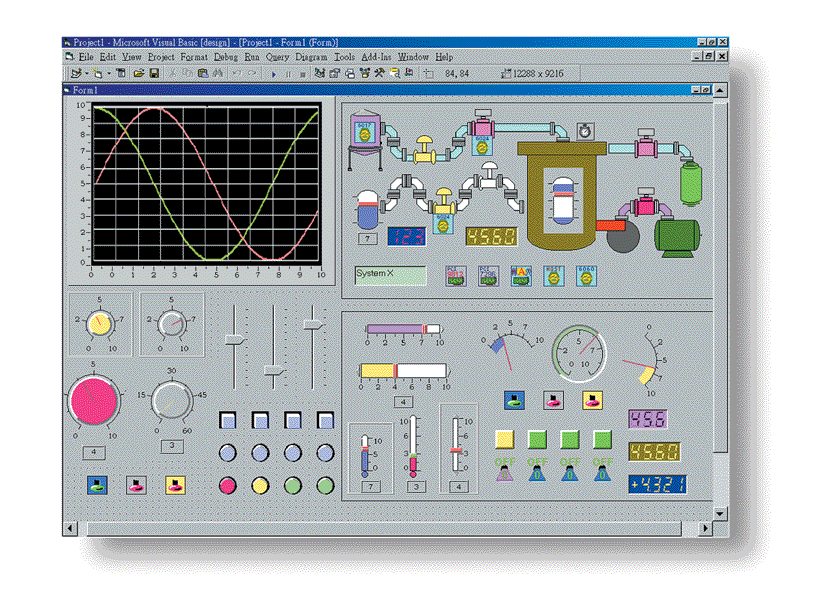
DAQView is a specialized data acquisition (DAQ) system creation software designed specifically for ADLINK’s range of data acquisition cards and modules. It serves as a comprehensive interface for configuring, managing, and visualizing data collected through ADLINK hardware, enabling engineers, researchers, and system integrators to rapidly develop and deploy DAQ systems without extensive programming. The software provides a unified environment for signal measurement, data logging, and real-time analysis, ensuring seamless integration with ADLINK’s PCI, PXI, USB, and Ethernet-based DAQ devices.
2. Key Features
DAQView is engineered to simplify the process of building and managing data acquisition systems. Its key features include:
- Seamless Integration with ADLINK Hardware: Fully compatible with ADLINK’s DAQ card families, including PCI, PXI, USB, and Ethernet-based models.
- Graphical Configuration Interface: Provides an intuitive GUI for setting up channels, sampling rates, and trigger conditions without coding.
- Real-Time Data Visualization: Offers live waveform display, trend plotting, and statistical analysis tools for immediate insight into signal behavior.
- Multi-Channel Data Logging: Supports simultaneous acquisition from multiple analog and digital channels, with synchronized sampling.
- Flexible Data Export: Enables data export in standard formats (CSV, TXT, BIN, or MATLAB-compatible files) for post-processing and reporting.
- Trigger and Timing Control: Advanced trigger configuration (software, external, or level-based) and precise timing synchronization across multiple devices.
- Customizable Measurement Parameters: Users can define voltage ranges, sampling frequencies, and input modes (single-ended or differential).
- Device Auto-Detection: Automatically identifies connected ADLINK DAQ hardware and loads appropriate configuration profiles.
- Calibration and Diagnostics Tools: Built-in utilities for device calibration, self-test, and performance verification.
- Scripting and Automation Support: Optional scripting interface for repetitive test sequences and automated data collection.
- User-Friendly Interface: Designed for both novice and expert users, minimizing setup time and reducing the need for manual configuration.
3. Technical Specifications
While DAQView is a software product, its technical specifications relate to system requirements, supported hardware, and operational parameters:
- Supported Operating Systems: Windows 10/11 (64-bit), Windows Server 2019 or later.
- Processor Requirements: Intel Core i5 or higher (recommended i7 or equivalent for high-speed acquisition).
- Memory Requirements: Minimum 8 GB RAM (recommended 16 GB for large datasets).
- Storage Requirements: 500 MB installation space; additional space required for data logging.
- Display Resolution: Minimum 1280 × 800; optimized for 1920 × 1080 or higher.
- Supported Interfaces: PCI, PCIe, PXI, PXIe, USB, and Ethernet-based ADLINK DAQ devices.
- Data Throughput: Dependent on hardware; supports up to multi-MHz sampling rates per channel when paired with compatible ADLINK cards.
- File Formats Supported: CSV, TXT, BIN, MATLAB (.mat), and proprietary ADLINK data formats.
- Communication Protocols: ADLINK proprietary driver interface, DAQPilot API, and Windows COM interface.
- Security: User-level access control and configuration file encryption.
4. Functionality
DAQView functions as a central control and visualization platform for ADLINK data acquisition hardware. It provides a structured workflow for system setup, data collection, and analysis:
- System Configuration: Users can select connected ADLINK DAQ cards, assign channels, and configure input parameters such as voltage range, sampling rate, and input mode.
- Signal Acquisition: The software initiates data capture from analog, digital, or counter/timer channels, synchronizing across multiple devices when required.
- Data Visualization: Real-time plotting tools display waveforms, frequency spectra, and statistical summaries.
- Data Logging: Continuous or triggered data recording to local or network storage, with timestamping and metadata tagging.
- Post-Processing: Basic analysis tools for filtering, averaging, and FFT (Fast Fourier Transform) operations.
- Compatibility: Works with ADLINK’s DAQPilot driver suite and supports integration with third-party analysis tools such as MATLAB, LabVIEW, and Python via API.
- Applications:
- Laboratory testing and measurement
- Industrial process monitoring
- Sensor calibration and validation
- Environmental data logging
- Research and development experiments
- Production line quality assurance
5. Components & Accessories
Included Items:
- DAQView Software Installer (digital download or physical media)
- User Manual and Quick Start Guide (PDF format)
- License Key (single-user or site license options)
- ADLINK DAQPilot Driver Package (required for hardware communication)
Optional Add-Ons:
- Advanced Analysis Module (FFT, filtering, and statistical tools)
- Automation Toolkit (scripting and batch processing support)
- Remote Monitoring Extension (network-based data access)
- Data Export Plug-ins (for MATLAB, Excel, and SQL databases)
Connectors and Interfaces:
- Software communicates with ADLINK hardware via PCI, PXI, USB, or Ethernet interfaces.
- Supports synchronization cables and external trigger inputs through compatible ADLINK DAQ cards.
6. Installation & Setup
System Requirements:
- Windows 10/11 (64-bit)
- Administrator privileges for installation
- ADLINK DAQPilot driver package installed prior to DAQView setup
Installation Steps:
1. Download or insert the DAQView installation package.
2. Run the setup executable and follow the on-screen instructions.
3. Install the DAQPilot driver suite if not already present.
4. Connect ADLINK DAQ hardware to the host system.
5. Launch DAQView; the software will automatically detect connected devices.
6. Configure channels, sampling parameters, and data storage options.
Mounting and Configuration:
- As a software product, DAQView does not require physical mounting.
- Configuration profiles can be saved and reused across multiple systems.
- Supports remote configuration via network connection for distributed DAQ setups.
7. Performance & Capabilities
DAQView’s performance is closely tied to the capabilities of the connected ADLINK hardware. However, the software is optimized to handle high-speed, multi-channel data acquisition efficiently.
- Sampling Rate: Supports up to multi-megasample per second (MS/s) rates depending on hardware.
- Channel Capacity: Unlimited logical channels; physical channel count determined by installed DAQ cards.
- Data Throughput: Optimized for sustained high-speed data streaming to disk with minimal latency.
- Efficiency: Multi-threaded architecture ensures smooth operation even during large-scale data collection.
- Latency: Sub-millisecond response time for trigger and acquisition start.
- Scalability: Supports multiple DAQ devices operating in parallel or synchronized mode.
- Limitations:
- Performance depends on system hardware (CPU, RAM, disk speed).
- Requires ADLINK hardware; not compatible with third-party DAQ cards.
- Advanced analysis features may require optional modules.
8. Standards & Compliance
DAQView and associated ADLINK hardware comply with international standards for data acquisition and software quality:
- Software Compliance:
- Developed under ISO 9001:2015 certified processes.
- Follows Microsoft Windows application development guidelines.
- Hardware Compatibility Standards:
- PCI Express, PXI, and USB 3.0 compliance (via ADLINK hardware).
- IEEE 488.2 and SCPI command compatibility through DAQPilot API.
- Regulatory Compliance:
- CE and FCC compliance (for associated hardware).
- RoHS Directive 2011/65/EU compliant.
- WEEE Directive 2012/19/EU compliant.
- Industry Standards:
- Supports IEEE 1588 Precision Time Protocol (PTP) synchronization (with compatible hardware).
- Compatible with OPC UA and Modbus TCP for industrial integration (via optional modules).
9. Additional Information
Warranty:
- Standard 1-year software warranty covering defects and updates.
- Optional extended maintenance contracts available for 3 or 5 years.
Support:
- Technical support via ADLINK’s global support portal.
- Email and phone support during business hours.
- Access to online knowledge base, FAQs, and user forums.
Maintenance:
- Regular software updates provided through ADLINK’s update service.
- Automatic update notifications within the application.
- Backward compatibility maintained with previous DAQPilot driver versions.
Licensing & Updates:
- Single-user, multi-user, and site licenses available.
- License activation via online or offline methods.
- Periodic updates include new hardware support, performance enhancements, and bug fixes.
Documentation:
- Comprehensive user manual with step-by-step configuration examples.
- API reference guide for developers integrating DAQView with custom applications.
- Release notes detailing version changes and supported hardware lists.
Training & Resources:
- Online tutorials and webinars for new users.
- Application notes and case studies demonstrating real-world implementations.
- Developer SDK available for advanced integration and automation.
Summary
DAQView is a robust, feature-rich data acquisition system creation software tailored for ADLINK’s extensive range of DAQ hardware. It bridges the gap between hardware-level signal capture and user-level data analysis, offering a complete environment for measurement, monitoring, and control applications. With its intuitive interface, real-time visualization, and extensive compatibility with ADLINK’s PCI, PXI, USB, and Ethernet devices, DAQView empowers engineers and researchers to design and deploy high-performance DAQ systems efficiently.
Its modular architecture, compliance with industry standards, and support for automation and remote monitoring make it suitable for laboratory, industrial, and research environments. Backed by ADLINK’s global support and continuous software updates, DAQView stands as a reliable, scalable, and future-ready solution for professional data acquisition needs.
Product Name: DAQView
Model: DAQView Software Suite
Series: ADLINK Data Acquisition Software Tools
Article Number: DAQView
Manufacturer: ADLINK Technology Inc.
DAQView is a specialized data acquisition (DAQ) system creation software designed specifically for ADLINK’s range of data acquisition cards and modules. It serves as a comprehensive interface for configuring, managing, and visualizing data collected through ADLINK hardware, enabling engineers, researchers, and system integrators to rapidly develop and deploy DAQ systems without extensive programming. The software provides a unified environment for signal measurement, data logging, and real-time analysis, ensuring seamless integration with ADLINK’s PCI, PXI, USB, and Ethernet-based DAQ devices.
2. Key Features
DAQView is engineered to simplify the process of building and managing data acquisition systems. Its key features include:
- Seamless Integration with ADLINK Hardware: Fully compatible with ADLINK’s DAQ card families, including PCI, PXI, USB, and Ethernet-based models.
- Graphical Configuration Interface: Provides an intuitive GUI for setting up channels, sampling rates, and trigger conditions without coding.
- Real-Time Data Visualization: Offers live waveform display, trend plotting, and statistical analysis tools for immediate insight into signal behavior.
- Multi-Channel Data Logging: Supports simultaneous acquisition from multiple analog and digital channels, with synchronized sampling.
- Flexible Data Export: Enables data export in standard formats (CSV, TXT, BIN, or MATLAB-compatible files) for post-processing and reporting.
- Trigger and Timing Control: Advanced trigger configuration (software, external, or level-based) and precise timing synchronization across multiple devices.
- Customizable Measurement Parameters: Users can define voltage ranges, sampling frequencies, and input modes (single-ended or differential).
- Device Auto-Detection: Automatically identifies connected ADLINK DAQ hardware and loads appropriate configuration profiles.
- Calibration and Diagnostics Tools: Built-in utilities for device calibration, self-test, and performance verification.
- Scripting and Automation Support: Optional scripting interface for repetitive test sequences and automated data collection.
- User-Friendly Interface: Designed for both novice and expert users, minimizing setup time and reducing the need for manual configuration.
3. Technical Specifications
While DAQView is a software product, its technical specifications relate to system requirements, supported hardware, and operational parameters:
- Supported Operating Systems: Windows 10/11 (64-bit), Windows Server 2019 or later.
- Processor Requirements: Intel Core i5 or higher (recommended i7 or equivalent for high-speed acquisition).
- Memory Requirements: Minimum 8 GB RAM (recommended 16 GB for large datasets).
- Storage Requirements: 500 MB installation space; additional space required for data logging.
- Display Resolution: Minimum 1280 × 800; optimized for 1920 × 1080 or higher.
- Supported Interfaces: PCI, PCIe, PXI, PXIe, USB, and Ethernet-based ADLINK DAQ devices.
- Data Throughput: Dependent on hardware; supports up to multi-MHz sampling rates per channel when paired with compatible ADLINK cards.
- File Formats Supported: CSV, TXT, BIN, MATLAB (.mat), and proprietary ADLINK data formats.
- Communication Protocols: ADLINK proprietary driver interface, DAQPilot API, and Windows COM interface.
- Security: User-level access control and configuration file encryption.
4. Functionality
DAQView functions as a central control and visualization platform for ADLINK data acquisition hardware. It provides a structured workflow for system setup, data collection, and analysis:
- System Configuration: Users can select connected ADLINK DAQ cards, assign channels, and configure input parameters such as voltage range, sampling rate, and input mode.
- Signal Acquisition: The software initiates data capture from analog, digital, or counter/timer channels, synchronizing across multiple devices when required.
- Data Visualization: Real-time plotting tools display waveforms, frequency spectra, and statistical summaries.
- Data Logging: Continuous or triggered data recording to local or network storage, with timestamping and metadata tagging.
- Post-Processing: Basic analysis tools for filtering, averaging, and FFT (Fast Fourier Transform) operations.
- Compatibility: Works with ADLINK’s DAQPilot driver suite and supports integration with third-party analysis tools such as MATLAB, LabVIEW, and Python via API.
- Applications:
- Laboratory testing and measurement
- Industrial process monitoring
- Sensor calibration and validation
- Environmental data logging
- Research and development experiments
- Production line quality assurance
5. Components & Accessories
Included Items:
- DAQView Software Installer (digital download or physical media)
- User Manual and Quick Start Guide (PDF format)
- License Key (single-user or site license options)
- ADLINK DAQPilot Driver Package (required for hardware communication)
Optional Add-Ons:
- Advanced Analysis Module (FFT, filtering, and statistical tools)
- Automation Toolkit (scripting and batch processing support)
- Remote Monitoring Extension (network-based data access)
- Data Export Plug-ins (for MATLAB, Excel, and SQL databases)
Connectors and Interfaces:
- Software communicates with ADLINK hardware via PCI, PXI, USB, or Ethernet interfaces.
- Supports synchronization cables and external trigger inputs through compatible ADLINK DAQ cards.
6. Installation & Setup
System Requirements:
- Windows 10/11 (64-bit)
- Administrator privileges for installation
- ADLINK DAQPilot driver package installed prior to DAQView setup
Installation Steps:
1. Download or insert the DAQView installation package.
2. Run the setup executable and follow the on-screen instructions.
3. Install the DAQPilot driver suite if not already present.
4. Connect ADLINK DAQ hardware to the host system.
5. Launch DAQView; the software will automatically detect connected devices.
6. Configure channels, sampling parameters, and data storage options.
Mounting and Configuration:
- As a software product, DAQView does not require physical mounting.
- Configuration profiles can be saved and reused across multiple systems.
- Supports remote configuration via network connection for distributed DAQ setups.
7. Performance & Capabilities
DAQView’s performance is closely tied to the capabilities of the connected ADLINK hardware. However, the software is optimized to handle high-speed, multi-channel data acquisition efficiently.
- Sampling Rate: Supports up to multi-megasample per second (MS/s) rates depending on hardware.
- Channel Capacity: Unlimited logical channels; physical channel count determined by installed DAQ cards.
- Data Throughput: Optimized for sustained high-speed data streaming to disk with minimal latency.
- Efficiency: Multi-threaded architecture ensures smooth operation even during large-scale data collection.
- Latency: Sub-millisecond response time for trigger and acquisition start.
- Scalability: Supports multiple DAQ devices operating in parallel or synchronized mode.
- Limitations:
- Performance depends on system hardware (CPU, RAM, disk speed).
- Requires ADLINK hardware; not compatible with third-party DAQ cards.
- Advanced analysis features may require optional modules.
8. Standards & Compliance
DAQView and associated ADLINK hardware comply with international standards for data acquisition and software quality:
- Software Compliance:
- Developed under ISO 9001:2015 certified processes.
- Follows Microsoft Windows application development guidelines.
- Hardware Compatibility Standards:
- PCI Express, PXI, and USB 3.0 compliance (via ADLINK hardware).
- IEEE 488.2 and SCPI command compatibility through DAQPilot API.
- Regulatory Compliance:
- CE and FCC compliance (for associated hardware).
- RoHS Directive 2011/65/EU compliant.
- WEEE Directive 2012/19/EU compliant.
- Industry Standards:
- Supports IEEE 1588 Precision Time Protocol (PTP) synchronization (with compatible hardware).
- Compatible with OPC UA and Modbus TCP for industrial integration (via optional modules).
9. Additional Information
Warranty:
- Standard 1-year software warranty covering defects and updates.
- Optional extended maintenance contracts available for 3 or 5 years.
Support:
- Technical support via ADLINK’s global support portal.
- Email and phone support during business hours.
- Access to online knowledge base, FAQs, and user forums.
Maintenance:
- Regular software updates provided through ADLINK’s update service.
- Automatic update notifications within the application.
- Backward compatibility maintained with previous DAQPilot driver versions.
Licensing & Updates:
- Single-user, multi-user, and site licenses available.
- License activation via online or offline methods.
- Periodic updates include new hardware support, performance enhancements, and bug fixes.
Documentation:
- Comprehensive user manual with step-by-step configuration examples.
- API reference guide for developers integrating DAQView with custom applications.
- Release notes detailing version changes and supported hardware lists.
Training & Resources:
- Online tutorials and webinars for new users.
- Application notes and case studies demonstrating real-world implementations.
- Developer SDK available for advanced integration and automation.
Summary
DAQView is a robust, feature-rich data acquisition system creation software tailored for ADLINK’s extensive range of DAQ hardware. It bridges the gap between hardware-level signal capture and user-level data analysis, offering a complete environment for measurement, monitoring, and control applications. With its intuitive interface, real-time visualization, and extensive compatibility with ADLINK’s PCI, PXI, USB, and Ethernet devices, DAQView empowers engineers and researchers to design and deploy high-performance DAQ systems efficiently.
Its modular architecture, compliance with industry standards, and support for automation and remote monitoring make it suitable for laboratory, industrial, and research environments. Backed by ADLINK’s global support and continuous software updates, DAQView stands as a reliable, scalable, and future-ready solution for professional data acquisition needs.
No manuals/catalogs available.
No accessories available.