 LOOKING FOR THE RIGHT
INDUSTRIAL SOLUTION?
Discover embedded, communication and automation solutions tailored to your application.

- Full OPC Compliance: Implements the OPC Data Access (DA) specification, ensuring compatibility with any OPC-compliant client software such as SCADA, HMI, MES, and data historian systems.
- Broad Hardware Support: Compatible with a wide range of ADLINK PCI and CompactPCI (cPCI) data acquisition (DAQ), digital I/O, analog I/O, and motion control cards.
- Real-Time Data Exchange: Provides high-speed, low-latency communication between ADLINK hardware and OPC clients, enabling real-time monitoring and control.
- Unified Interface: Offers a standardized interface for multiple ADLINK cards, reducing integration complexity and development time.
- Automatic Tag Generation: Automatically detects installed ADLINK cards and generates corresponding OPC tags for all available channels and parameters.
- Scalable Architecture: Supports multiple cards and channels simultaneously, allowing flexible system expansion.
- User-Friendly Configuration: Includes an intuitive configuration utility for mapping hardware channels to OPC items without programming.
- Robust Error Handling: Built-in diagnostics and error reporting mechanisms ensure reliable operation and simplified troubleshooting.
- Windows Compatibility: Designed for Microsoft Windows operating systems commonly used in industrial automation environments.
- Secure Data Access: Supports user authentication and access control through OPC server security settings.
- High Reliability: Optimized for continuous 24/7 operation in industrial and laboratory applications.
- Broad Hardware Support: Compatible with a wide range of ADLINK PCI and CompactPCI (cPCI) data acquisition (DAQ), digital I/O, analog I/O, and motion control cards.
- Real-Time Data Exchange: Provides high-speed, low-latency communication between ADLINK hardware and OPC clients, enabling real-time monitoring and control.
- Unified Interface: Offers a standardized interface for multiple ADLINK cards, reducing integration complexity and development time.
- Automatic Tag Generation: Automatically detects installed ADLINK cards and generates corresponding OPC tags for all available channels and parameters.
- Scalable Architecture: Supports multiple cards and channels simultaneously, allowing flexible system expansion.
- User-Friendly Configuration: Includes an intuitive configuration utility for mapping hardware channels to OPC items without programming.
- Robust Error Handling: Built-in diagnostics and error reporting mechanisms ensure reliable operation and simplified troubleshooting.
- Windows Compatibility: Designed for Microsoft Windows operating systems commonly used in industrial automation environments.
- Secure Data Access: Supports user authentication and access control through OPC server security settings.
- High Reliability: Optimized for continuous 24/7 operation in industrial and laboratory applications.
1. Product Overview
Product Name: OPC Driver for ADLINK Cards
Model: PCIS-OPC
Series: PCIS Software Integration Series
Article Number: PCIS-OPC
Manufacturer: ADLINK Technology Inc.
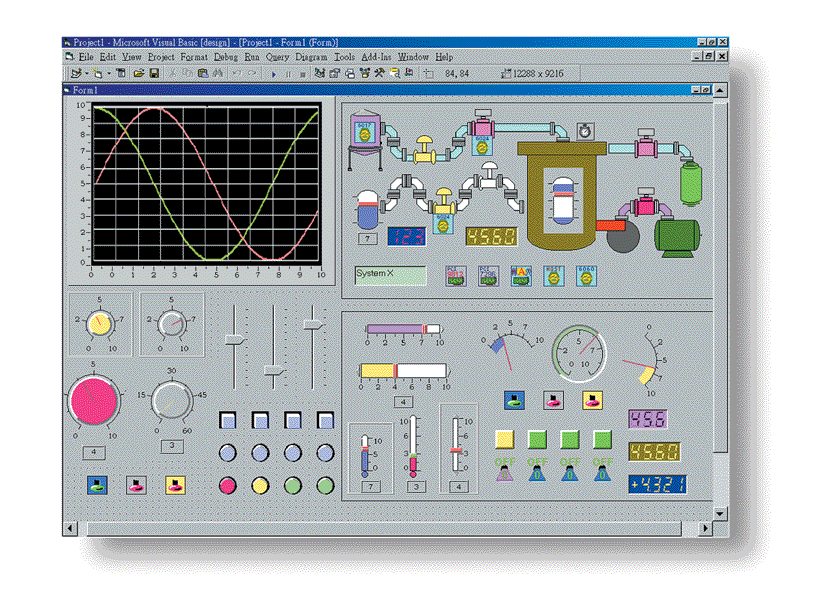
The PCIS-OPC is a specialized software driver developed by ADLINK Technology to provide seamless integration between ADLINK’s PCI and CompactPCI (cPCI) data acquisition and control cards and industrial automation systems that utilize the OPC (OLE for Process Control) communication standard. Designed for engineers, system integrators, and automation professionals, the PCIS-OPC driver enables standardized, real-time data exchange between ADLINK hardware and a wide range of SCADA, HMI, and industrial control software platforms.
This driver acts as a middleware layer, translating ADLINK hardware signals and data into OPC-compliant objects accessible through OPC DA (Data Access) interfaces. It simplifies the process of connecting ADLINK’s measurement and control cards to supervisory systems, ensuring interoperability, scalability, and ease of configuration in industrial environments.
2. Key Features
- Full OPC Compliance: Implements the OPC Data Access (DA) specification, ensuring compatibility with any OPC-compliant client software such as SCADA, HMI, MES, and data historian systems.
- Broad Hardware Support: Compatible with a wide range of ADLINK PCI and CompactPCI (cPCI) data acquisition (DAQ), digital I/O, analog I/O, and motion control cards.
- Real-Time Data Exchange: Provides high-speed, low-latency communication between ADLINK hardware and OPC clients, enabling real-time monitoring and control.
- Unified Interface: Offers a standardized interface for multiple ADLINK cards, reducing integration complexity and development time.
- Automatic Tag Generation: Automatically detects installed ADLINK cards and generates corresponding OPC tags for all available channels and parameters.
- Scalable Architecture: Supports multiple cards and channels simultaneously, allowing flexible system expansion.
- User-Friendly Configuration: Includes an intuitive configuration utility for mapping hardware channels to OPC items without programming.
- Robust Error Handling: Built-in diagnostics and error reporting mechanisms ensure reliable operation and simplified troubleshooting.
- Windows Compatibility: Designed for Microsoft Windows operating systems commonly used in industrial automation environments.
- Secure Data Access: Supports user authentication and access control through OPC server security settings.
- High Reliability: Optimized for continuous 24/7 operation in industrial and laboratory applications.
3. Technical Specifications
- Product Type: Software driver (OPC server)
- Supported Hardware: ADLINK PCI and CompactPCI (cPCI) data acquisition and control cards
- Supported Interfaces: PCI, CompactPCI bus architectures
- Supported OPC Standards: OPC Data Access (DA) 2.0 / 3.0
- Operating Systems: Windows 10 / Windows 11 / Windows Server editions (32-bit and 64-bit versions, depending on ADLINK card driver support)
- Communication Protocol: OLE for Process Control (COM/DCOM-based)
- Data Types Supported: Boolean, Integer, Float, Double, String, Array (depending on card capabilities)
- Update Rate: Configurable; typical scan rates from 10 ms to several seconds
- Performance Metrics:
- Data throughput: dependent on system configuration and card type
- Latency: typically <10 ms for local OPC client connections
- System Requirements:
- CPU: Intel Core i3 or higher
- RAM: Minimum 4 GB (8 GB recommended)
- Disk Space: 200 MB for installation
- Network: Required for remote OPC client connections
- Software Dependencies: Microsoft .NET Framework (version as required by ADLINK driver package), ADLINK DAQ driver libraries (DAQPilot or equivalent)
- Licensing: Per installation or per system license (depending on ADLINK licensing policy)
- File Format: Executable installer with configuration files (.ini, .xml)
4. Functionality
The PCIS-OPC driver functions as an OPC server, bridging ADLINK’s hardware-level data acquisition and control interfaces with higher-level OPC client applications. Once installed, it detects all ADLINK PCI and cPCI cards present in the system through the ADLINK driver layer. Each detected card’s channels—analog inputs, analog outputs, digital inputs, digital outputs, counters, timers, or motion axes—are automatically mapped to OPC items (tags).
Users can configure these tags through the included configuration utility, assigning meaningful names, scaling factors, engineering units, and update rates. The OPC server then continuously polls the hardware for data updates and publishes these values to connected OPC clients. Conversely, when an OPC client writes to an output tag, the driver transmits the corresponding command to the ADLINK card in real time.
Typical Use Cases:
- Industrial process monitoring and control
- Data acquisition for laboratory and test systems
- Integration of ADLINK DAQ cards with SCADA/HMI software
- Machine automation and motion control systems
- Remote data logging and supervisory control applications
Compatibility:
- Compatible with major OPC client software such as Wonderware InTouch, Siemens WinCC, GE iFIX, Inductive Automation Ignition, and others.
- Works with ADLINK’s full range of PCI and cPCI DAQ cards, including analog input/output, digital I/O, and counter/timer modules.
5. Components & Accessories
Included Items:
- PCIS-OPC software package (installation executable)
- Configuration utility for OPC tag setup
- User manual and installation guide (PDF format)
- License key or activation code (depending on distribution method)
- Release notes and version history
Optional Add-ons:
- ADLINK DAQPilot or equivalent driver suite (required for hardware communication)
- Additional ADLINK software tools for calibration, diagnostics, and data logging
- OPC client software (purchased separately)
Connectors and Interfaces:
- Software-based; communicates via system bus (PCI/cPCI) and OPC COM/DCOM interfaces
- No physical connectors beyond those provided by the ADLINK hardware
6. Installation & Setup
Requirements:
- A PC or industrial computer equipped with one or more ADLINK PCI or cPCI cards
- Installed ADLINK hardware drivers (DAQPilot or equivalent)
- Administrative privileges for software installation
Installation Steps:
1. Install the ADLINK hardware drivers and verify card functionality using ADLINK’s test utilities.
2. Run the PCIS-OPC installer and follow on-screen instructions.
3. During installation, the setup program registers the OPC server with the Windows system.
4. Launch the configuration utility to detect installed ADLINK cards.
5. Configure OPC tags, assign names, scaling, and update intervals.
6. Start the OPC server service.
7. Connect an OPC client to the server using the registered ProgID or CLSID.
Mounting Options:
- Software-only product; no physical mounting required.
- Can be deployed on local or remote systems depending on network architecture.
Configuration:
- Tag configuration stored in XML or INI files for easy backup and replication.
- Supports import/export of configuration profiles.
- Allows manual or automatic tag generation.
7. Performance & Capabilities
The PCIS-OPC driver is optimized for high-performance data acquisition and control tasks. It leverages ADLINK’s low-level driver libraries to achieve minimal latency and efficient data throughput.
Speed and Capacity:
- Supports multiple simultaneous OPC client connections.
- Handles hundreds to thousands of OPC tags depending on system resources.
- Typical update rates configurable from 10 ms to several seconds.
- Efficient memory management ensures stable operation under heavy load.
Efficiency:
- Multi-threaded architecture for parallel data handling.
- Optimized polling algorithms reduce CPU usage.
- Dynamic update rate adjustment based on client demand.
Limitations:
- Performance depends on the number of channels, polling rate, and system hardware.
- Network latency may affect remote OPC client performance.
- Requires ADLINK hardware drivers to be installed and operational.
Reliability:
- Designed for continuous operation in industrial environments.
- Automatic reconnection and error recovery mechanisms.
- Event logging for diagnostics and maintenance.
8. Standards & Compliance
- OPC Compliance: Fully compliant with OPC Data Access (DA) 2.0 and 3.0 specifications.
- Operating System Compliance: Compatible with Microsoft Windows operating systems adhering to standard COM/DCOM architecture.
- Industrial Standards: Supports integration with systems conforming to ISA-95 and IEC 61131-based automation frameworks.
- Regulatory Compliance:
- Software conforms to CE and FCC requirements when used with compliant ADLINK hardware.
- Developed under ISO 9001-certified quality management processes.
- Security Standards: Supports Windows authentication and DCOM security settings for controlled access.
9. Additional Information
Warranty:
- Standard ADLINK software warranty (typically one year from purchase date).
- Covers defects in software media and licensing.
Support:
- Technical support available through ADLINK’s global support network.
- Online resources include FAQs, knowledge base, and driver updates.
- Email and phone support for registered users.
Maintenance:
- Regular software updates provided to ensure compatibility with new ADLINK hardware and OPC standards.
- Patch releases for bug fixes and performance improvements.
- Backward compatibility maintained with previous ADLINK card generations.
Updates:
- Periodic updates available via ADLINK’s website or customer portal.
- Version release notes detail new features, supported hardware, and resolved issues.
Documentation:
- Comprehensive user manual with installation, configuration, and troubleshooting instructions.
- Application notes and integration guides for specific ADLINK cards.
Licensing & Activation:
- License activation via serial number or online registration.
- Single-user or site licenses available.
Summary:
The ADLINK PCIS-OPC driver is a robust, standards-based software solution that bridges ADLINK’s PCI and CompactPCI data acquisition hardware with OPC-compliant automation systems. It simplifies integration, enhances interoperability, and provides a reliable communication layer for real-time industrial data exchange. With its comprehensive hardware support, user-friendly configuration, and adherence to OPC standards, PCIS-OPC is an essential tool for engineers and integrators seeking to unify ADLINK hardware with modern SCADA, HMI, and control environments.
Product Name: OPC Driver for ADLINK Cards
Model: PCIS-OPC
Series: PCIS Software Integration Series
Article Number: PCIS-OPC
Manufacturer: ADLINK Technology Inc.
The PCIS-OPC is a specialized software driver developed by ADLINK Technology to provide seamless integration between ADLINK’s PCI and CompactPCI (cPCI) data acquisition and control cards and industrial automation systems that utilize the OPC (OLE for Process Control) communication standard. Designed for engineers, system integrators, and automation professionals, the PCIS-OPC driver enables standardized, real-time data exchange between ADLINK hardware and a wide range of SCADA, HMI, and industrial control software platforms.
This driver acts as a middleware layer, translating ADLINK hardware signals and data into OPC-compliant objects accessible through OPC DA (Data Access) interfaces. It simplifies the process of connecting ADLINK’s measurement and control cards to supervisory systems, ensuring interoperability, scalability, and ease of configuration in industrial environments.
2. Key Features
- Full OPC Compliance: Implements the OPC Data Access (DA) specification, ensuring compatibility with any OPC-compliant client software such as SCADA, HMI, MES, and data historian systems.
- Broad Hardware Support: Compatible with a wide range of ADLINK PCI and CompactPCI (cPCI) data acquisition (DAQ), digital I/O, analog I/O, and motion control cards.
- Real-Time Data Exchange: Provides high-speed, low-latency communication between ADLINK hardware and OPC clients, enabling real-time monitoring and control.
- Unified Interface: Offers a standardized interface for multiple ADLINK cards, reducing integration complexity and development time.
- Automatic Tag Generation: Automatically detects installed ADLINK cards and generates corresponding OPC tags for all available channels and parameters.
- Scalable Architecture: Supports multiple cards and channels simultaneously, allowing flexible system expansion.
- User-Friendly Configuration: Includes an intuitive configuration utility for mapping hardware channels to OPC items without programming.
- Robust Error Handling: Built-in diagnostics and error reporting mechanisms ensure reliable operation and simplified troubleshooting.
- Windows Compatibility: Designed for Microsoft Windows operating systems commonly used in industrial automation environments.
- Secure Data Access: Supports user authentication and access control through OPC server security settings.
- High Reliability: Optimized for continuous 24/7 operation in industrial and laboratory applications.
3. Technical Specifications
- Product Type: Software driver (OPC server)
- Supported Hardware: ADLINK PCI and CompactPCI (cPCI) data acquisition and control cards
- Supported Interfaces: PCI, CompactPCI bus architectures
- Supported OPC Standards: OPC Data Access (DA) 2.0 / 3.0
- Operating Systems: Windows 10 / Windows 11 / Windows Server editions (32-bit and 64-bit versions, depending on ADLINK card driver support)
- Communication Protocol: OLE for Process Control (COM/DCOM-based)
- Data Types Supported: Boolean, Integer, Float, Double, String, Array (depending on card capabilities)
- Update Rate: Configurable; typical scan rates from 10 ms to several seconds
- Performance Metrics:
- Data throughput: dependent on system configuration and card type
- Latency: typically <10 ms for local OPC client connections
- System Requirements:
- CPU: Intel Core i3 or higher
- RAM: Minimum 4 GB (8 GB recommended)
- Disk Space: 200 MB for installation
- Network: Required for remote OPC client connections
- Software Dependencies: Microsoft .NET Framework (version as required by ADLINK driver package), ADLINK DAQ driver libraries (DAQPilot or equivalent)
- Licensing: Per installation or per system license (depending on ADLINK licensing policy)
- File Format: Executable installer with configuration files (.ini, .xml)
4. Functionality
The PCIS-OPC driver functions as an OPC server, bridging ADLINK’s hardware-level data acquisition and control interfaces with higher-level OPC client applications. Once installed, it detects all ADLINK PCI and cPCI cards present in the system through the ADLINK driver layer. Each detected card’s channels—analog inputs, analog outputs, digital inputs, digital outputs, counters, timers, or motion axes—are automatically mapped to OPC items (tags).
Users can configure these tags through the included configuration utility, assigning meaningful names, scaling factors, engineering units, and update rates. The OPC server then continuously polls the hardware for data updates and publishes these values to connected OPC clients. Conversely, when an OPC client writes to an output tag, the driver transmits the corresponding command to the ADLINK card in real time.
Typical Use Cases:
- Industrial process monitoring and control
- Data acquisition for laboratory and test systems
- Integration of ADLINK DAQ cards with SCADA/HMI software
- Machine automation and motion control systems
- Remote data logging and supervisory control applications
Compatibility:
- Compatible with major OPC client software such as Wonderware InTouch, Siemens WinCC, GE iFIX, Inductive Automation Ignition, and others.
- Works with ADLINK’s full range of PCI and cPCI DAQ cards, including analog input/output, digital I/O, and counter/timer modules.
5. Components & Accessories
Included Items:
- PCIS-OPC software package (installation executable)
- Configuration utility for OPC tag setup
- User manual and installation guide (PDF format)
- License key or activation code (depending on distribution method)
- Release notes and version history
Optional Add-ons:
- ADLINK DAQPilot or equivalent driver suite (required for hardware communication)
- Additional ADLINK software tools for calibration, diagnostics, and data logging
- OPC client software (purchased separately)
Connectors and Interfaces:
- Software-based; communicates via system bus (PCI/cPCI) and OPC COM/DCOM interfaces
- No physical connectors beyond those provided by the ADLINK hardware
6. Installation & Setup
Requirements:
- A PC or industrial computer equipped with one or more ADLINK PCI or cPCI cards
- Installed ADLINK hardware drivers (DAQPilot or equivalent)
- Administrative privileges for software installation
Installation Steps:
1. Install the ADLINK hardware drivers and verify card functionality using ADLINK’s test utilities.
2. Run the PCIS-OPC installer and follow on-screen instructions.
3. During installation, the setup program registers the OPC server with the Windows system.
4. Launch the configuration utility to detect installed ADLINK cards.
5. Configure OPC tags, assign names, scaling, and update intervals.
6. Start the OPC server service.
7. Connect an OPC client to the server using the registered ProgID or CLSID.
Mounting Options:
- Software-only product; no physical mounting required.
- Can be deployed on local or remote systems depending on network architecture.
Configuration:
- Tag configuration stored in XML or INI files for easy backup and replication.
- Supports import/export of configuration profiles.
- Allows manual or automatic tag generation.
7. Performance & Capabilities
The PCIS-OPC driver is optimized for high-performance data acquisition and control tasks. It leverages ADLINK’s low-level driver libraries to achieve minimal latency and efficient data throughput.
Speed and Capacity:
- Supports multiple simultaneous OPC client connections.
- Handles hundreds to thousands of OPC tags depending on system resources.
- Typical update rates configurable from 10 ms to several seconds.
- Efficient memory management ensures stable operation under heavy load.
Efficiency:
- Multi-threaded architecture for parallel data handling.
- Optimized polling algorithms reduce CPU usage.
- Dynamic update rate adjustment based on client demand.
Limitations:
- Performance depends on the number of channels, polling rate, and system hardware.
- Network latency may affect remote OPC client performance.
- Requires ADLINK hardware drivers to be installed and operational.
Reliability:
- Designed for continuous operation in industrial environments.
- Automatic reconnection and error recovery mechanisms.
- Event logging for diagnostics and maintenance.
8. Standards & Compliance
- OPC Compliance: Fully compliant with OPC Data Access (DA) 2.0 and 3.0 specifications.
- Operating System Compliance: Compatible with Microsoft Windows operating systems adhering to standard COM/DCOM architecture.
- Industrial Standards: Supports integration with systems conforming to ISA-95 and IEC 61131-based automation frameworks.
- Regulatory Compliance:
- Software conforms to CE and FCC requirements when used with compliant ADLINK hardware.
- Developed under ISO 9001-certified quality management processes.
- Security Standards: Supports Windows authentication and DCOM security settings for controlled access.
9. Additional Information
Warranty:
- Standard ADLINK software warranty (typically one year from purchase date).
- Covers defects in software media and licensing.
Support:
- Technical support available through ADLINK’s global support network.
- Online resources include FAQs, knowledge base, and driver updates.
- Email and phone support for registered users.
Maintenance:
- Regular software updates provided to ensure compatibility with new ADLINK hardware and OPC standards.
- Patch releases for bug fixes and performance improvements.
- Backward compatibility maintained with previous ADLINK card generations.
Updates:
- Periodic updates available via ADLINK’s website or customer portal.
- Version release notes detail new features, supported hardware, and resolved issues.
Documentation:
- Comprehensive user manual with installation, configuration, and troubleshooting instructions.
- Application notes and integration guides for specific ADLINK cards.
Licensing & Activation:
- License activation via serial number or online registration.
- Single-user or site licenses available.
Summary:
The ADLINK PCIS-OPC driver is a robust, standards-based software solution that bridges ADLINK’s PCI and CompactPCI data acquisition hardware with OPC-compliant automation systems. It simplifies integration, enhances interoperability, and provides a reliable communication layer for real-time industrial data exchange. With its comprehensive hardware support, user-friendly configuration, and adherence to OPC standards, PCIS-OPC is an essential tool for engineers and integrators seeking to unify ADLINK hardware with modern SCADA, HMI, and control environments.
No manuals/catalogs available.
No accessories available.